Accent tapping
This article documents my ongoing journey of finding an optimal accent input method for Czech letter accents, and a few tidbits from the history of keyboard standardization.
The Czech Keyboard Layout
The whole reason for this journey is the Czech keyboard layout. Aspects of keyboard design remain among the most absurd examples of path dependence, key stagger especially, and the Czech keyboard layout is no exception. Czech children who learn to type on modern computers today are effectively learning layouts designed for late 1800s Austro-Hungarian clerks using typewriters.
So, like many programmers, at some point I realized my life will be a lot easier if I at least transition to the US layout. The German swap of Y and Z keys was the most difficult thing to rewire my brain out of. And then there was the issue of letter accents.
By default, you have the choice of swapping to a Czech layout whenever you need to type Czech. The issue with swapping to the default Czech layout is you're not swapping languages. You're completely changing the input method for symbols like ;, ! and #. Symbols which should in no way be affected by letter accents.
The closest keyboard layouts come to resolving this is the Czech Programmers layout, which introduces a basic form of accent pre-modding.
Pre-mod (Composing)
By pre-modding I just mean pressing a modifier key before the letter to print it with an accent. Historically, Compose key has sometimes been used, but Right Alt (or AltGr) remains a popular choice for this nowadays.
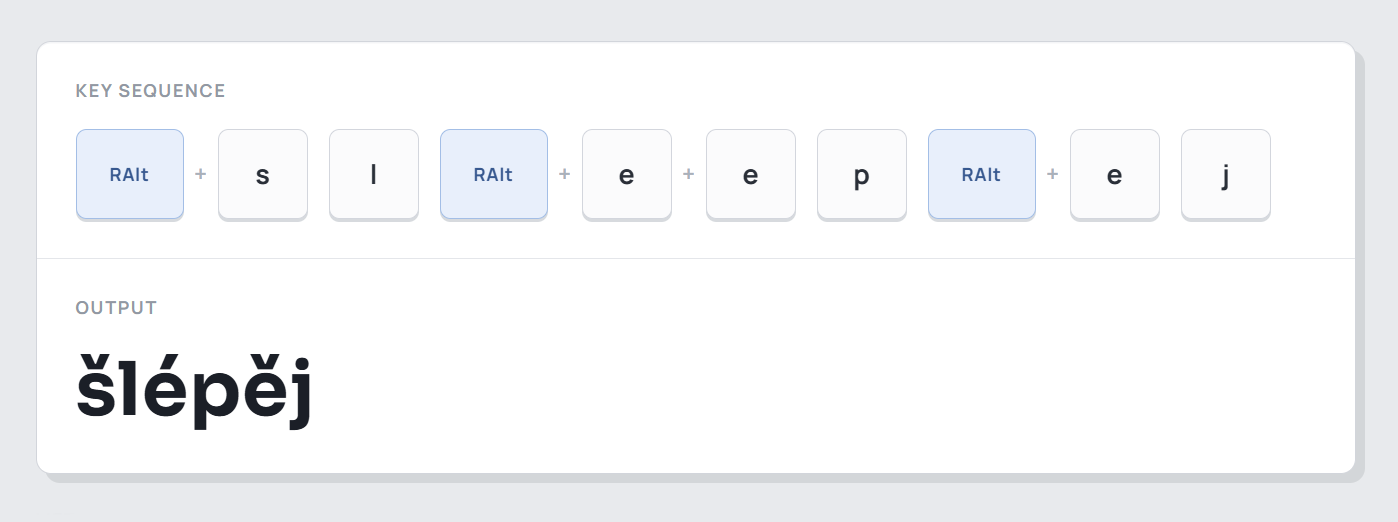
This method is a good starting point. The conflict of ě vs é can be resolved by different compose combos. In the example above, RAlt + e prints ě, while RAlt + e + e prints the less common é.
What I didn't like about this approach is that it requires planning ahead. In handwriting, accents are always written after the letter itself. And while it's likely possible to rewire the brain to think about whether the letter ahead needs an accent, it by no means feels intuitive. Which is why I experimented with post-modding.
Post-mod
By this I mean pressing a modifier key after the letter to retroactively change its accent. Other accent variants are then done using multiple taps of the modifier key. E.g. e + RAlt + RAlt prints the second accent variant, and we can keep looping through the accent variants.
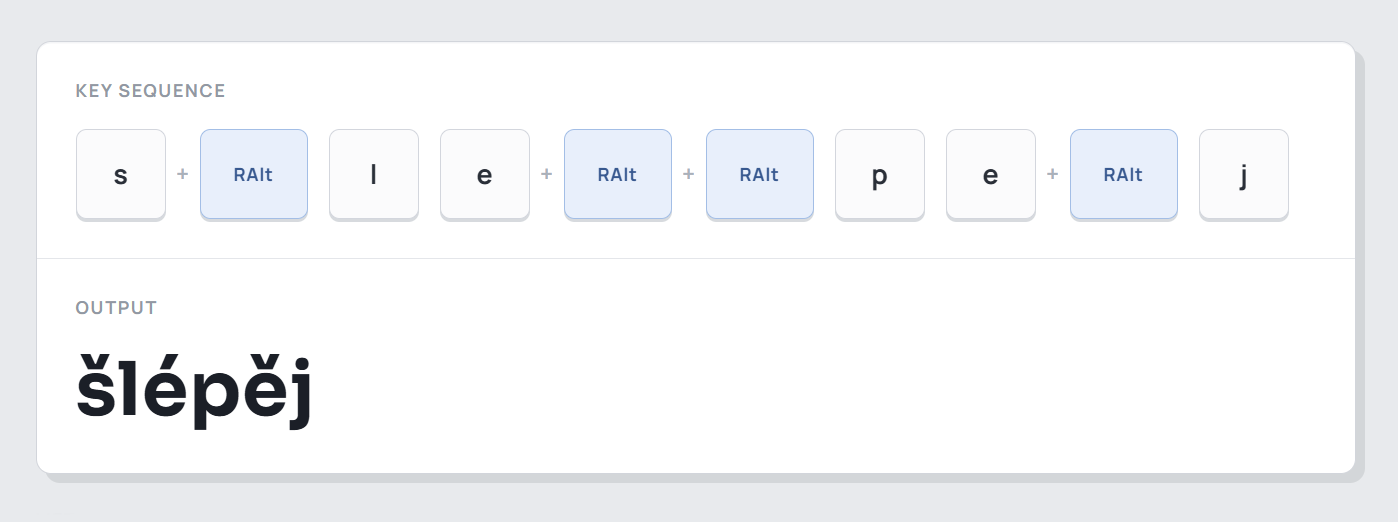
I used post-modding for a while and liked it a lot more than pre-modding. But the biggest issue I found was ergonomics. Whatever modifier key you choose, the distance to each letter will vary. Some accents can be triggered one handed, while others are more involved. And it never felt natural or intuitive to reach over for a special key. It always felt like it interrupted my writing flow.
Maybe that's obvious. Composing had historically been used for special symbols and sequences, only triggered every once in a while. I don't think it was ever meant to be used this way. But at this point it was the best method I had. But I kept looking for others.
Hotstrings
I encountered hotstrings on a Reddit post from a French user. This method is allegedly a great fit for French accents, and I was very curious how it worked.
By pressing two letter combos, in any order, you can output an accented symbol. Turns out AutoHotkey even natively supports this functionality.
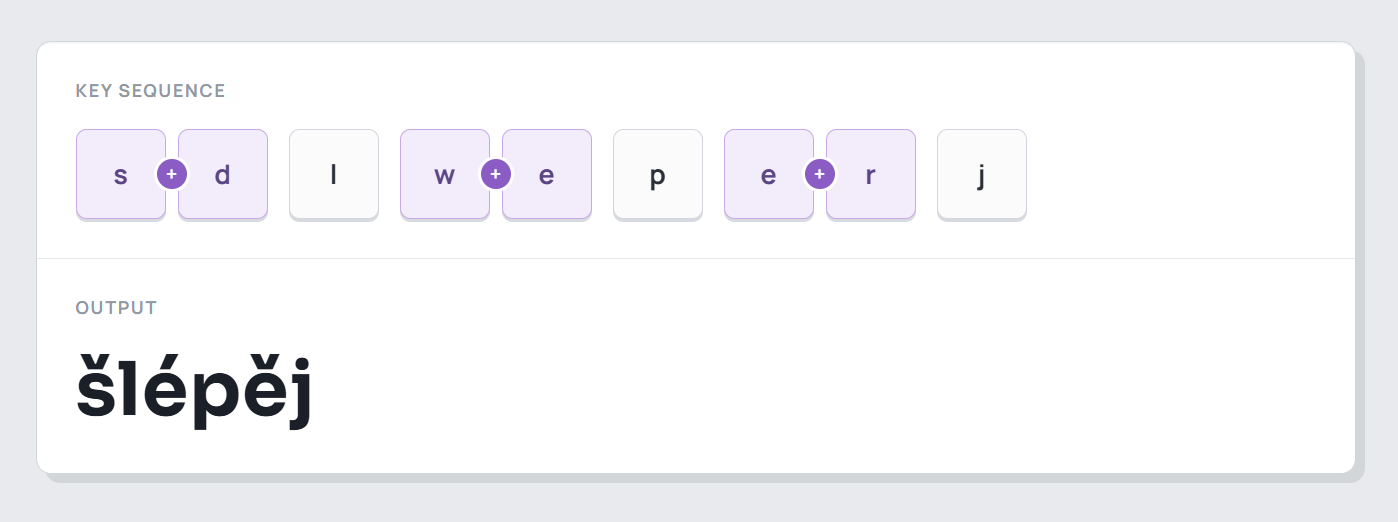
The idea is that pressing a combo left of e gives you one accent, and right of e gives you another. And because they're linked to the e key, it's much more ergonomic and intuitive than pressing a special distant modifier key.
Unfortunately, I immediately had an issue mapping all the Czech accents onto suitable hotstrings. The top row needs 9 accents mapped onto only 7 keys, all right next to each other, and there just isn't enough space to map them all horizontally. I suppose you could map them vertically in different ways, but that kind of ruins the elegance of the idea.
On top of that, I found that typing using this method creates issues when typing with rollover. You have to tweak the time window to be tight enough so it allows for rollover, but wide enough so it reliably registers hitting the two keys at the same time.
Ultimately, hotstrings are a very interesting system, I just didn't find them suitable for my particular use case.
Hold
Inspired by how hotstrings kept the proximity to the combos to their respective keys, I wondered if we could encode the entire functionality within the keys themselves. So next I tried holding a key to cycle through its accents.
Hold it for one interval to get an accent. Two intervals re-print the character with its second variant. The variants visually reprint as you're holding the key over time.
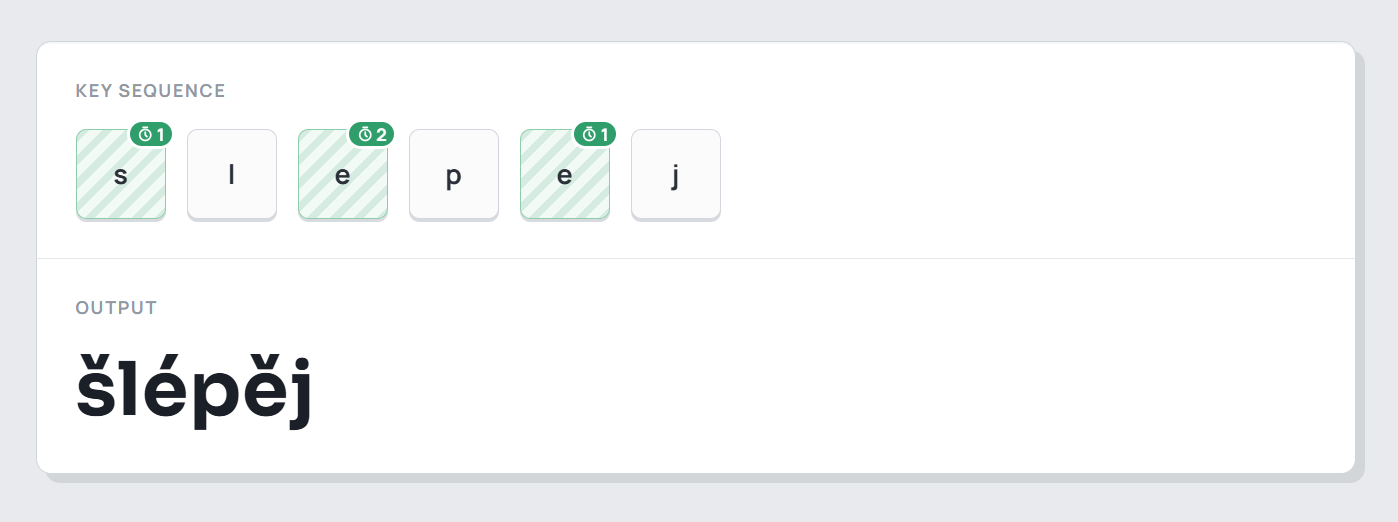
A bit like with hotstrings, the interval time amount has to be tweaked. Except here it might be impossible to get right. The hold interval should at the same time be as short as possible, to not waste your time while typing, but also be as long as possible to give you enough time to select the accent variant you want. It's a push-pull contradiction that seems impossible to resolve.
This method is time sensitive, which means you can easily mess up if you miss the interval window of your desired accent. But we did manage to encapsulate the functionality completely within each respective key, and that did feel like an improvement. Now we don't need any other keys to trigger an accent on a character.
PowerAccent / Quick accent
Among the projects I came across, PowerAccent is pretty good. While holding a letter, press the activation key. Press it again to cycle through available accents.
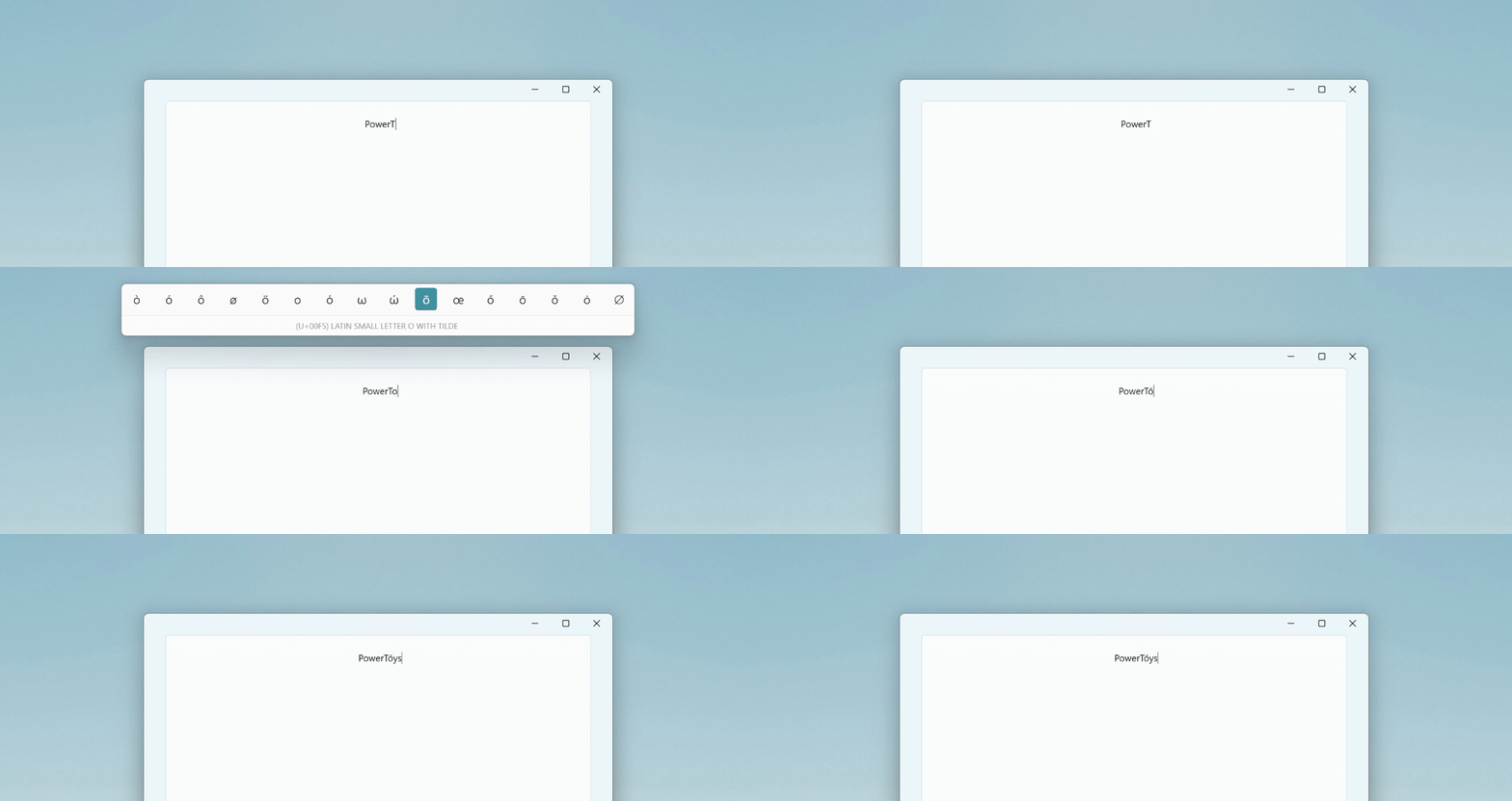
Effectively it's post-modding with pretty UI to go with it. But I found it had the same issues as post-modding, breaking the flow of typing and interfering when you type with rollover, especially if you go with Space as the suggested activation key.
Autocorrect
Autocorrect certainly deserves an honorable mention, because it does exist, is ubiquitous on mobile, and largely seems to serve its purpose.
The issue with autocorrect is that it relies on prediction, and as such, doesn't work for typing unpredictable things like unusual accented words or slang. That's acceptable on phones, but I'm specifically interested in generic keyboard input methods that could theoretically be implemented on any OS, for any keyboard, and be used to reliably and consistently type anything. Autocorrect is not that. Its quality and function highly depend on implementation details and input modality.
The only autocorrect system I can imagine would fulfill my strict criteria of determinism and infallibility is one which would read your mind, so it would always correct to the specific string of symbols you meant to type. At which point, we could probably get rid of typing altogether and solely use mindreading to type.
Bottom line is, autocorrect exists on PC in multiple forms and can probably be used to input accents, but it's such an abstract and fuzzy system that I'm personally not comfortable using it for that purpose.
Accent tapping
Now for the final and the best method I found specifically for typing accented letters in the Czech language.
Iterating on the Hold method, it can be improved by letting the user determine the time interval interactively by tapping the letter. Be as fast or slow as you want, and the system follows along. Input then looks like this.
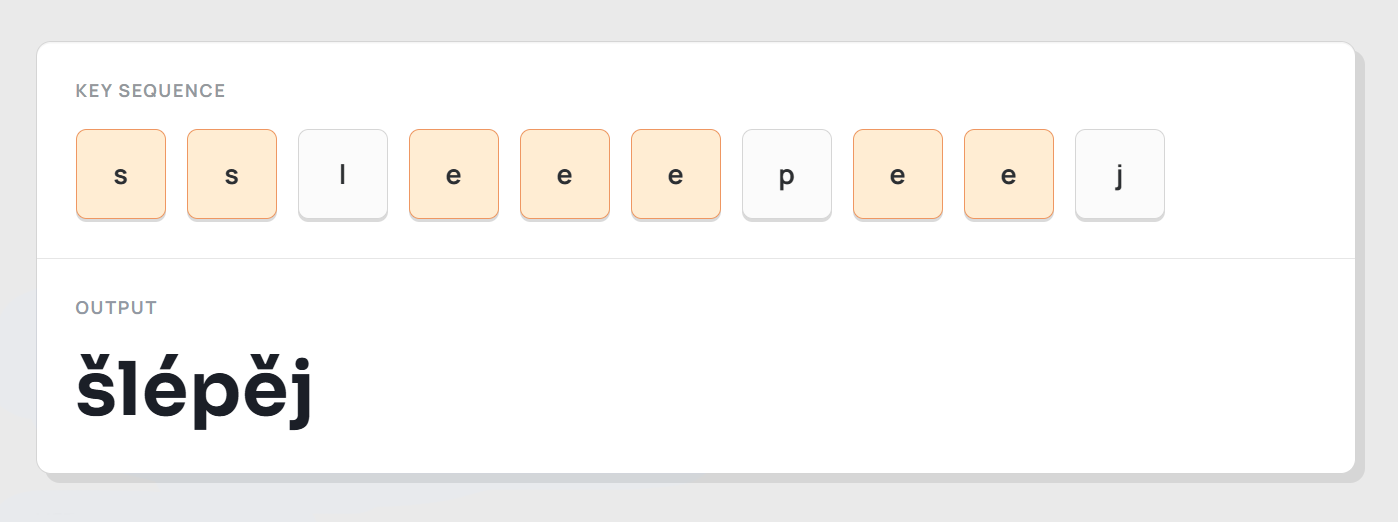
Turns out this is very intuitive, very ergonomic, and very reliable. Because there's no time limits or skill requirements, it's very hard to make a mistake.
Tapping for accents is the only system I've tried, which:
Doesn't require planning ahead
Is not time sensitive
Is equally ergonomic per-key and across different keyboards
Of course, the devil is in the details, so let's go through them.
What about double letters
The reason this method is especially suitable for Czech accents is because Czech words with doubled letters are relatively rare. Still, tapping works with them. The tapping sequence for a single accent variant goes as such:
sšssšš
This sequence allows us to type vyšší povinnost with only a single extra tap for nn. It absolutely is a tradeoff, but acceptable given the rarity of these cases.
Double accent variants are worse:
eěéeeěěéé
That means in order to type éé we have to press e 6 times. That's pretty bad. Which is why we're lucky that it doesn't appear anywhere in the Czech language. The same goes for úú, the only other two-variant letter. Effectively, all 5-tap and 6-tap combos don't appear anywhere in the Czech language, limiting the longest combos to 4 taps. However 4 taps still always produce 2 letters. So really 3 taps is the longest single letter combo we ever require.
The worst edge case
There is an edge case. Even rarer than doubled letters are cases of an accented letter appearing next to an unaccented letter.
sšít
This is possible, but admittedly the worst case scenario. We have to type the first s, then cancel the accent sequence tracking, then type ss to print š, and then the rest. Breaking sequence tracking is done by tapping Esc or Ctrl. So the final input sequence goes:
s Esc s s i i t
Seven taps for a four letter word isn't too bad, but involving escape or control definitely breaks the flow, similar to having a RAlt modifier key.
Ultimately, these are rare edge cases, and they do have workarounds. The question is if the overall benefits outweigh the downsides. And I'd argue that they do.
Mode toggling
When typing in English, the mode needs to be turned off, because English contains so many doubled letters and it would get in the way all the time.
But then, have we really resolved anything? If we still have to toggle this tapping mode, why is tapping better than just toggling to a Czech keyboard layout?
With tapping, the layout doesn't change. We only toggle the ability to type accents. Switching layouts changes the entire layout, including things completely unrelated to accents. With tapping, typing symbols like
;,!and#stays perfectly consistent.Next, capitalization of accented letters is much more consistent with tapping. On Czech layouts, Shift capitalization only works in combination with the individual acute and caron keys, but direct accented letter mappings are limited to Caps Lock.
Lastly and most importantly, I believe accent mapping on Czech layouts is simply obsolete. The reason accented letters took priority over symbols on typewriters is because back in typewriter days people didn't need access to
@to type email addresses,#to denote markdown headings, and brackets for programming. Nowadays, the convenience of the standard US number row mapping is just as important as Czech letter accents and should be used together. Further, the placements of some accented letters likeůandúin Czech layouts are completely arbitrary and follow no logical pattern. Much like key stagger, we're dealing with a historical artifact that deserves to be reinvented. And while my solution isn't perfect, I believe it's a big step in the right direction.
In closing
For now, I use tapping daily and haven't looked back since, but I'm also still thinking about this and searching for the perfect solution without the last few drawbacks.
AHK scripts for each of the methods I mention are available in my personal GitHub repository. Feel free to try them if you're interested. Most of the scripts aren't polished, but they're functional and act as good demos of the methods. The most polished one is the tapping method.